
Content Repurposing Strategy That Saves Hours Every Week
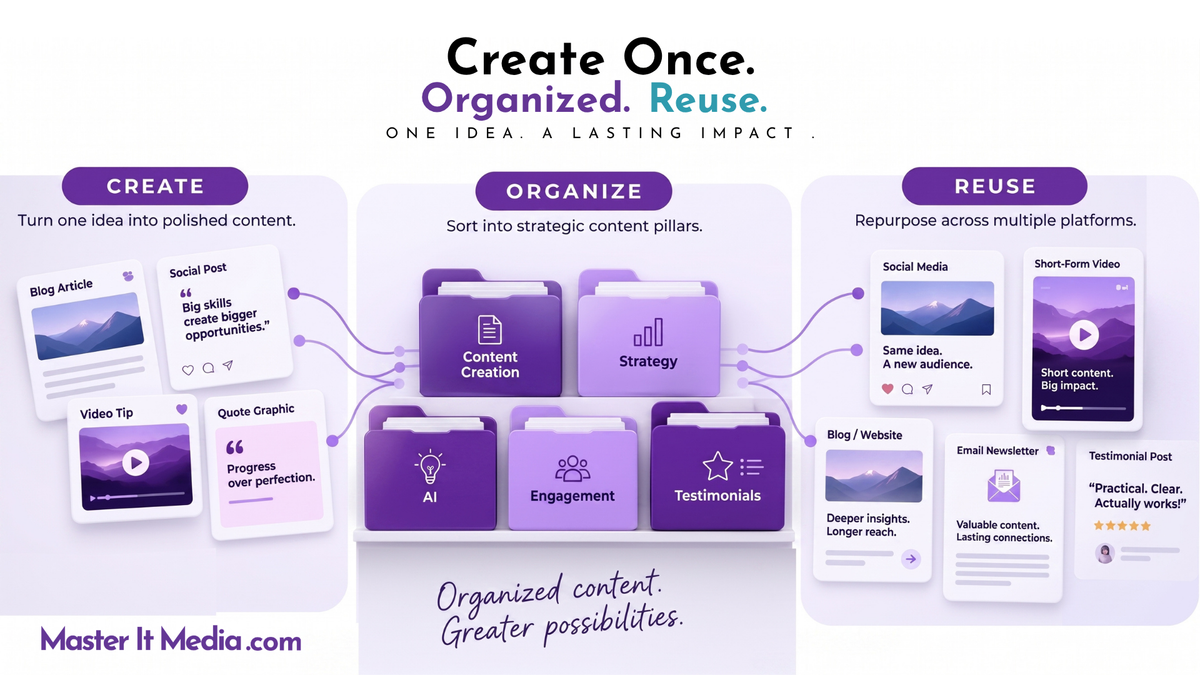
One of the biggest reasons content creation feels exhausting is that business owners keep starting from scratch.
A new idea. A new caption. A new graphic. A new video.
Then they publish it, move on, and start the whole process again the next day.
There’s a much easier way to approach this.
Stop treating your content like it’s disposable.
Every post you create contains something valuable: your knowledge, experience, ideas, expertise, personality, solutions, or stories from your business.
That makes your content a business asset.
And if you organize those assets so you can actually find them again, they can keep working for you long after the day you hit publish.
That’s where a content library comes in.
1. Give Your Content Somewhere to Live
Think about what usually happens after you publish a social media post.
Maybe it gets a handful of likes. Maybe people comment. Maybe it performs incredibly well.
Then a few days pass, and you move on to something new.
Six months later, you vaguely remember creating a great post on the exact topic you need right now. You remember the general idea. You might even remember what the graphic looked like.
But where is it?
So you start scrolling.
And scrolling.
And scrolling.
Twenty minutes later, you give up and create something new.

Sound familiar?
A content library solves that problem.
A content library is simply one organized place where you keep the content you have already created so you can search, find, update, and reuse it.
It can include social media captions, graphics, videos, blog posts, emails, podcast episodes, testimonials, frequently asked questions, evergreen posts, content ideas, and series you have created.
The tool itself matters far less than the system.
You could use a spreadsheet, Google Drive, Canva, a project management tool, a database, or a social media management platform with a built-in library.
What matters is that you stop relying on your memory to find everything you have created.
2. Organize Your Library Around Your Content Pillars
Putting everything into one giant folder is technically a library.
It’s just not a very useful one.
You need a simple way to organize what you create, and this is where content pillars can help.
Content pillars are the main topics your business consistently talks about. If you’re old school like me, think of them as the folders in a filing cabinet.
For Master It Media, those topics might include content creation, social media strategy, engagement, AI, personal branding, business visibility, tips and tricks, and testimonials.
A health and wellness coach might focus on nutrition, movement, mindset, sleep, and healthy habits.
A home service company might organize content around maintenance tips, common problems, customer questions, seasonal reminders, and behind-the-scenes information.
Your content pillars connect what you know with what your audience needs.
They also help you see whether your content is balanced.
Maybe you discover that you are constantly promoting your services but rarely educating your audience. Or perhaps you give plenty of tips but almost never share the stories, results, or experiences that help people understand why they should work with you.
I’ve made that mistake myself.
Organizing your content makes those patterns much easier to see.
3. Keep the System Simple Enough to Use
You do not need 20 categories, a complicated color-coding system, or a database that takes longer to maintain than your actual social media.
Start with five or six core topics you want to be known for.
Then add simple tags that make individual pieces of content easier to find later. You might tag something based on the platform, audience, format, offer, campaign, season, or a more specific topic.
For example, imagine you are a business coach and create a post about overcoming the fear of raising your prices.
You might place it under your Mindset pillar and tag it with Pricing, Confidence, and Business Growth.
Six months later, you decide to create a series about confidence.
Instead of staring at a blank screen, you search your Confidence tag and immediately see the ideas you have already developed.
That’s a much easier place to start.
4. Build on What You’ve Already Created
One of my favorite examples of this is my Content Confidence series.

I wanted to create a consistent series that would help business owners feel more confident showing up on social media.
I did not sit down every week and ask myself, “What completely new thing can I say about confidence today?”
I looked at ideas I had already talked about.
Being nervous on video. Worrying about what other people think. Feeling like you have nothing interesting to say. Comparing yourself to other business owners. Hesitating to share your opinions.
The ideas were already there.
I organized them into one series, batch-created the content, and tagged everything as part of Content Confidence.
That gave me 52 posts I could schedule throughout the year.
And because the ideas are evergreen, they don’t necessarily disappear once they have been published. I can update the graphic, change the opening, turn the idea into a video, approach it from another angle, or reuse the original when it still makes sense.
I created the idea once. Now I can keep building on it.
That is one of the biggest advantages of having a content library.
5. One Idea Can Become Much More Than One Post
Your content library also makes it easier to see connections between individual pieces of content.
Several posts answering customer questions could become an educational campaign.
A handful of tips around the same topic could become a carousel, video, blog post, newsletter, podcast episode, webinar, or email.
A social media post that generates an interesting question could become your next video.
A strong blog could give you several shorter social posts.
One idea does not have to stay in the format where it started.
You are getting more value from work you have already done.
I sometimes call this multipurposing.
You can also take one core idea and adapt it across different social platforms. The image or video might stay the same while the caption, introduction, length, or presentation changes to fit the platform.
That doesn’t mean creating completely different content for Facebook, Instagram, LinkedIn, and every other platform.
It means giving a good idea more opportunities to reach the people who need it.
6. Stop Assuming Everyone Has Already Seen It
One of the most common objections I hear about reusing content is:
“But I’ve already posted that.”
Are you sure everyone saw it?
Someone in your audience may spend most of their time on LinkedIn and rarely look at Facebook. Someone else may be active on Instagram and almost never open LinkedIn.
Even people who follow you closely are unlikely to see every piece of content you publish.
And if you originally posted something a year ago, there’s a good chance your audience doesn’t remember it.
You may not remember it either.
So if the information is still accurate and useful, why automatically retire it?
I’ve been married for almost 40 years. Let me tell you something. I repeat myself.
You probably do the same thing in your business.
How many times have you answered the same customer question?
How many times have you explained the same process?
How many times have you given someone the same advice?
Repetition isn’t the problem. Boring repetition is the problem.
You can revisit a strong idea with a new opening, a different example, an updated graphic, a video, a customer story, or a connection to something happening in your business right now.
The core lesson stays useful. The presentation evolves.
7. Let Your Analytics Help Decide What Comes Back
Your library shouldn’t simply store content.
It should help you learn from it.
Go back and look at the content that generated comments, saves, shares, clicks, conversations, or other meaningful engagement.
Those results are giving you information about what caught your audience’s attention.
Don’t look at a successful post, celebrate for five minutes, and then forget about it.

Ask:
What can I do with this idea next?
Could you update it?
Create a follow-up?
Answer one of the questions people left in the comments?
Turn it into a series?
Make a video about it?
Approach the same problem from a different angle?
This is where your content library and your analytics start working together.
Don’t post and ghost.
Look at what worked, learn from it, and use that information to create more of what your audience actually wants.
8. Focus on Evergreen Content You Can Use Again
Not everything belongs in the reuse pile forever.
Platforms change. Features change. Your services change. Your opinions may change. Some advice simply becomes outdated.
That is why a healthy content library should include plenty of evergreen material.
Customer stories, frequently asked questions, lessons from your experience, general educational tips, mindset advice, testimonials, and core business principles often have a much longer shelf life.
You still need to review them before reposting, especially if they include statistics, platform instructions, dates, links, or anything else that could have changed.
But strong evergreen ideas can become some of the most useful pieces in your library.
Instead of automatically asking, “What should I create today?” you can start asking:
“What do I already have that I can build on?”
That question can save you a tremendous amount of time.
9. Start With the Content You Create Today
At this point, you may be thinking:
“Maggie, I have years of content. There is no way I’m organizing all of that.”

Don’t.
You do not have to reorganize your entire social media history before a content library can become useful.
Start today.
Choose your main content pillars. Decide where your library is going to live. Then begin saving and categorizing new content as you create it.
When you have time, go back and add some of your strongest older pieces.
Start with content that performed well, answers questions you hear repeatedly, represents your expertise, or covers evergreen topics you know you will discuss again.
Little by little, you will build a resource filled with ideas that already belong to your business and already reflect what you know.
Stop Starting With a Blank Screen
The next time you need to create content, imagine opening your library instead of opening a blank document.
Choose a pillar.
Search a topic.
Find something you have already created.
Then decide what the idea needs now.
Maybe you repost it. Maybe you update it. Maybe you turn it into a video. Maybe it becomes part of a larger series.
You can even take several of your strongest-performing posts and use AI to help you identify common themes or brainstorm related ideas.
For example, you might give your AI tool a selection of your best-performing posts and ask:
“What topics and themes are connecting these posts, and what related content could I create next?”
You are still making the decisions. AI is simply helping you examine information you already have.
Now you aren’t guessing what your audience might want.
You’re building on what they have already responded to.
Your Content Should Keep Working
Here’s the mindset I want you to remember:
Your content doesn’t stop being valuable because you hit publish.
Publishing is one part of the process.
Save the content. Organize it. Pay attention to what happens after you publish it. Keep the useful pieces available so you can return to them later.
The goal is not to create more and more content until you’re exhausted.
The goal is to get more value from the ideas, expertise, and work you have already put into your content.
That’s what makes content creation more sustainable.
And that’s what makes posting a whole lot more painless.
Want a Simpler Way to Organize and Reuse Your Content?
This is one of the reasons I built Painless Posting.

It gives me one place to organize content by category, find previous posts, review what performed well, build related groups and series, schedule content, and bring evergreen ideas back without scrolling through years of social media posts.
If you want to see how the system works, visit PainlessPosting.com and check out the demo.
The goal is simple: spend less time reinventing your content and more time getting value from what you have already created.
Related Resources
For a deeper dive into solution-focused content:
- Podcast Episode: Content Repurposing Strategy That Saves Hours Every Week
- YouTube Version: Watch the episode
Ready to master your media?
Let's make your social media simple, consistent, and worth it. Book a free strategy call.
Book a free strategy call →